Ready to switch to Hnry from Xero? We’re excited to have you on board.
The good news is the process is so simple, you barely have to think about it (just like your taxes, after you join Hnry). You can also join at any point throughout the financial year. Honestly, there’s no bad news.
To make the switch, all you have to do is:
- Sign up for Hnry (duh) and complete your profile
- Upload your pre-Hnry expenses
- Upload your clients and services (optional)
- Get paid (whoo!)
That’s it, that’s literally everything. From there, you’re all set to continue growing your business – without ever thinking about tax again.
Welcome to Hnry. You’re going to love it.

Step 1: Sign up for Hnry, and complete your profile
Signing up to Hnry only takes a few minutes!
First, you’ll need to enter your email address and create a password for your account. Then, we’ll gather a few details about your business. Next, we’ll need to verify your identity. Finally, we’ll pay you a dollar (no, really!) to show you how the service works.
Tell us about your business
To calculate your tax rate accurately, we’ll need to know:,
- Your estimated annual earnings (from all sources of income),
- Your work type,
- If you’re GST registered, and
- If you have a student loan.
💡 Note: If you’ve sent invoices using invoicing software prior to joining Hnry, you don’t need these invoices to be loaded into the Hnry system in order to use our service! All we need is your projected earnings for the year.
Verify your identity
We trust you, but we still need to know that you are who you say you are! Legally, we can’t process payments on your behalf unless we’ve verified that you’re a real human.
You’ll need to provide us with proof of your identity and take a quick selfie so we can match your face to your ID - the whole thing takes about 30 seconds!
To do this, you can use any of the following:
- Current passport
- An Australian or New Zealand driver’s licence
- A New Zealand Kiwi Access Card
Your document needs to be current – we can’t accept expired documents. Most identity verifications are approved instantly. In some cases we may need to take a closer look – if that happens, our team will aim to review the ID documents you submit in 1-2 business days.
Note: You can’t get a Hnry Account or send an Invoice/Quote without having your identity verified.
Earn a dollar
Now you’ll all signed up, we’ll even throw in a freebie – a single dollar that we pay to you, so you can see how the service works.
If you click through on the payment, you’ll be able to see the deductions we’ve made on your behalf.
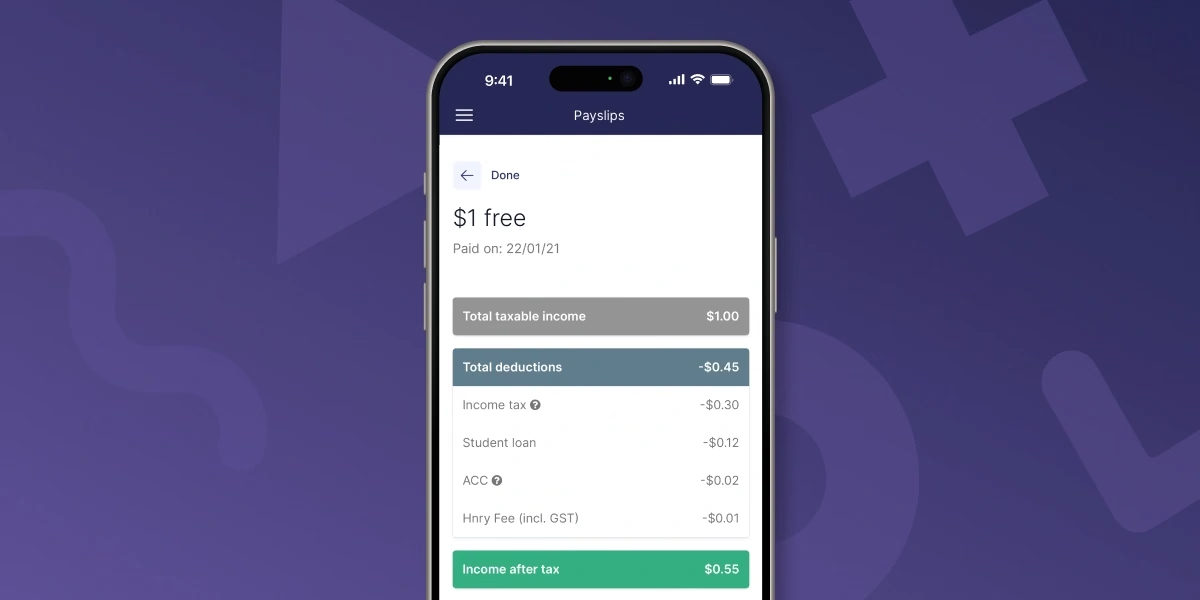
It’s a wee taster of what’s to come – self-employed income without having to do your own calculations and set money aside. Everything that lands in your personal bank account is yours to spend.
Step 2: Upload your pre-Hnry expenses
In order to maximise your tax savings, we need to be across any business expenses purchased before you join Hnry. You can do this in the Expenses tab of the app, by clicking the “Pre-Hnry Expenses” button when you first visit the page.
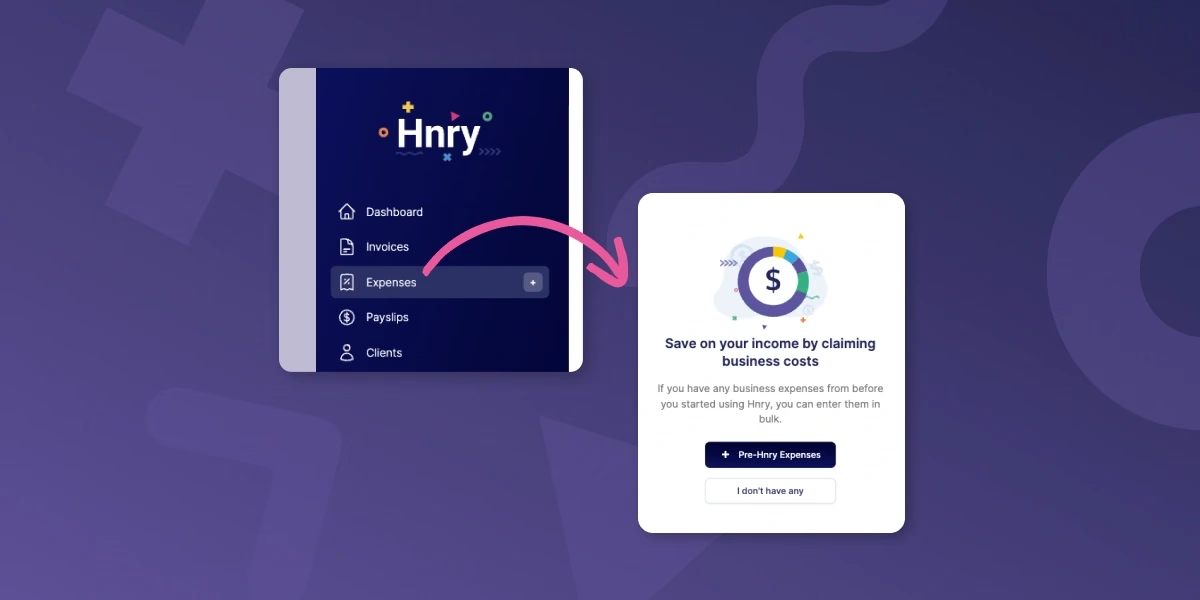
From there, all we need is the total amount you’re claiming for each expense category. If you’re not sure how to find this in Xero, that’s all good – we have helpful in-app content that will take you through the process.
Step 3: Upload your clients and services
This step is actually optional – you fully use Hnry without preemptively uploading your clients and services.
But if you’re after the smoothest invoicing process possible, this little step could save some serious time down the line!
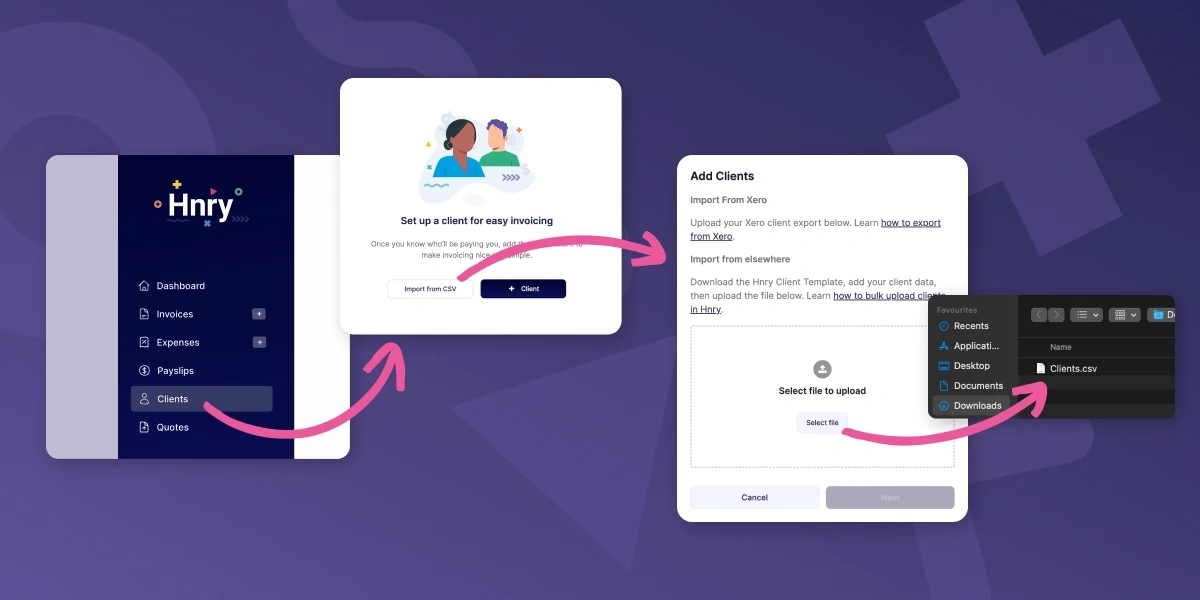
First, you’ll need to export your clients and services out of Xero in separate CSV files.
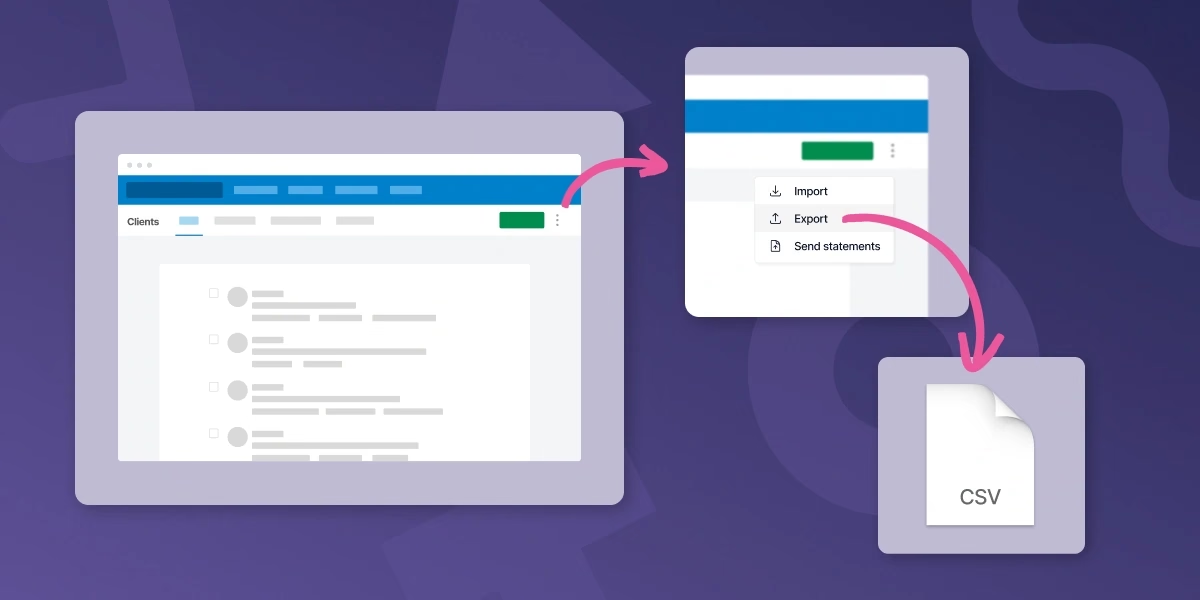
From there, you can download and use our simple CSV template to make sure you have the right formatting.
Upload this CSV file under the “Clients” or “Services” tab, double check everything looks right, and hit “Next”.
And voila! French!
Step 4: Get paid into your Hnry Account
This part’s the real magic.
Make sure you’re paid into your Hnry Account by updating your payment details with your clients, or invoicing through our app. As soon as payment comes through, we’ll calculate and deduct your taxes, levies, and whatnot, and send it to Inland Revenue on your behalf.
Everything else that lands in your personal bank account is yours to spend.
Forget a separate bank account for taxes, forget the surprise massive tax bill – our service has you covered for all that.
That’s it! You’re all set up and ready to go.
Hnry is for sole traders
Hnry is an award-winning app and service that’s designed specifically for the needs of sole traders. And we mean all your needs. If you get stuck during the switching process, you can call our team – we’re happy to help!
DISCLAIMER: The information on our website is for general educational purposes only. It doesn't cover all situations and circumstances, and shouldn't be taken as direct tax advice. If you're looking for specific help with your taxes, join Hnry and our team of experts can provide you with assistance tailored to your business needs.